
Practicing with Video Recording and Feedback
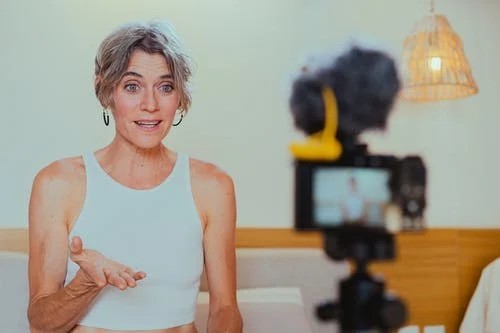
One of the most effective ways to improve presentation skills is to practice using video recording and structured feedback. In Cape Town—whether in corporate boardrooms, academic lecture halls, or community forums—professionals and students are increasingly using recording tools to refine their delivery. By watching themselves on screen, presenters can evaluate their voice, body language, timing, and overall clarity in a way that live practice alone cannot provide.
Why Video Recording Matters in Cape Town
-
Objective Self-Reflection: Many presenters are unaware of habits like pacing too fast, using filler words, or avoiding eye contact. Watching recordings reveals these blind spots.
-
Accessible Technology: Smartphones, laptops, and apps like Zoom, Microsoft Teams, or Google Meet are widely used in Cape Town, making recording simple and affordable.
-
Hybrid Work and Learning: With online presentations now common in local businesses, universities, and NGOs, practicing virtually is just as important as practicing face-to-face.
-
Diverse Feedback Opportunities: Cape Town’s multicultural setting allows presenters to seek input from people with different perspectives and communication preferences.
How to Practice with Video Recording
-
Set Up the Environment
-
Choose a quiet room with good lighting.
-
Position the camera at eye level.
-
Practice in a setting similar to where you’ll actually present (e.g., boardroom, lecture hall, or online call).
-
-
Record a Full Run-Through
-
Practice your entire presentation, not just sections.
-
Keep your slides or visual aids visible in the background if possible.
-
-
Review Objectively
-
Watch for voice clarity, tone, and pacing.
-
Observe body language—gestures, posture, and eye contact.
-
Notice audience engagement strategies (pauses, emphasis, storytelling).
-
-
Seek Constructive Feedback
-
Share the recording with colleagues, mentors, or classmates.
-
Use peer review in professional or academic settings (common in Cape Town training programs).
-
Ask specific questions: “Was I clear?”, “Did I keep your attention?”, “How was my pacing?”
-
Where Feedback Happens in Cape Town
-
Corporate Training Centers (Claremont, Century City): Companies use video-based coaching to develop leaders and client-facing staff.
-
Universities (UCT, CPUT, Stellenbosch satellite campuses): Students record practice presentations for research defenses, seminars, and group projects.
-
Community Workshops (Khayelitsha, Mitchells Plain): NGOs and community organizations encourage recorded practice for advocacy and public awareness campaigns.
-
Professional Development Programs: Public speaking clubs and training providers in Cape Town use video review as part of coaching sessions.
Tips for Using Feedback Effectively
-
Be Open to Criticism: Feedback is meant to help you improve, not discourage you.
-
Look for Patterns: If multiple people comment on the same habit (e.g., speaking too fast), focus on that area first.
-
Practice Again: Apply the feedback and record a second version to track improvement.
-
Balance Self-Critique: Don’t only focus on weaknesses—note strengths you can build on.
Why Choose This Course in Cape Town?
In Cape Town’s professional and educational landscape, video recording paired with constructive feedback is one of the most practical tools for improving presentations. By combining self-assessment with input from peers or mentors, presenters can sharpen their confidence, communication style, and impact. Whether preparing for a business pitch in the CBD, a thesis defense at UCT, or a community presentation in Khayelitsha, this approach ensures growth and lasting improvement.